
Tickets
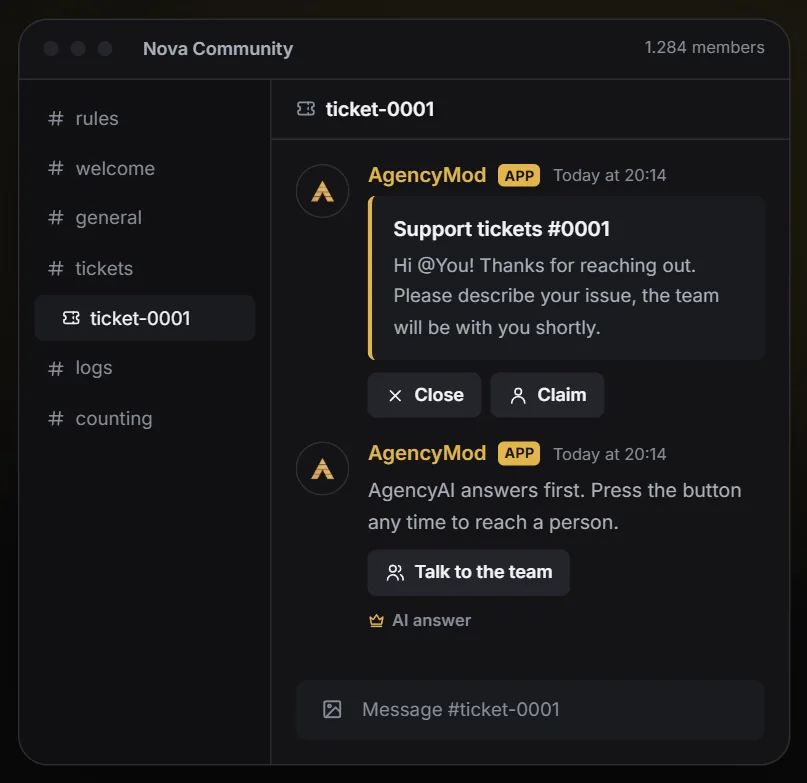
A support panel with buttons. Every ticket is a private channel for the member and your team.
What is it for?
A panel with buttons where members open a private support channel with your team. Tickets can be claimed and are closed with a transcript. With Premium, AgencyAI can answer first.Set it up in 3 steps
- 01Pick the channel for the panel, the category for new tickets and your team roles.
- 02Optional: create ticket categories, for example support, report or partnership, each with its own greeting, and adjust the panel's title, text and color.
- 03Save: the panel appears in the channel. Members click a button, and a private ticket channel opens.
TipSet a transcript channel: when a ticket is closed, the whole conversation is saved there and can also be sent to the member.
All settings explained
Switched on and off with the switch at the top of the tab.
Channels and team
- Panel channel
- Where the message with the ticket buttons is posted. It is updated automatically when you save.
- Ticket category
- New ticket channels are created in this category. Discord allows 50 channels per category.
- Support team
- These roles see and answer every ticket.
- Transcript channel
- When a ticket is closed, its history is posted here as a text file.
Categories
- Ticket categories
- Up to 10 buttons, for example Support, Report or Purchase. With more than 5 categories a dropdown is shown instead.
Panel
- Panel title
- Leave empty for the default title.
- Panel text
- Leave empty for the default text.
- Color
- Empty uses the main color.
Process
- Open tickets per member
- How many tickets one member may have open at the same time.
- Channel names
- How new ticket channels are named.
- Claim button
- Team members can take over a ticket so everyone knows who is on it.
- Ping the team
- Mention the support roles when a ticket opens.
- Transcript for the member
- Send the history to the person who opened the ticket when it is closed.
AI
- AI first answerPremium
- AgencyAI answers first with your knowledge. The member can call the team at any time with one click.
- AI instructions for ticketsPremium
- Additional rules for the AI in tickets, for example what it should never promise.
- AI summary in the transcriptPremium
- When a ticket is closed, AgencyAI writes a short summary of the problem and the solution at the top of the transcript.
Commands
/ticketManage ticketsSomething unclear? Open a ticket at help.agencyg.de in the AgencyMod category or ask in our Discord. Privacy policy and terms